
Maryam Ki Dastak App 2026 – Online Registration, Government Services & Application Tracking
Looking for a driving licence, a birth certificate, domicile certificate or another government service in Punjab? The Maryam Ki Dastak portal combines many of the government services so that citizens may access the relevant service without having to search for it across multiple websites of different government departments.
The portal offers two modes of service, including self-service for those willing to apply for documents online and doorstep service for those who choose to have their documents collected by the authorities or get it delivered to their residence. The self-service mode is the default option, although other choices are available according to the selected service.
What is Maryam Ki Dastak?
Maryam Ki Dastak is an online portal launched by the Punjab government to provide a single accessible point for selected government services. The portal houses the services of the relevant departments under one roof and is managed by the Punjab Information Technology Board. Instead of having to visit various government websites to identify the relevant application, users can browse through the Dastak service directory, log in, and follow the instructions on their selected services.
The portal also allows for tracking of applications. Customers who used to engage with any of the systems, including DLIMS, the government might have migrated to will be able to connect their existing system accounts after logging in to access their application data.
How to Register in Maryam Ki Dask in 2026
The initial step is to create a citizen account, which enables citizens to access online services provided through the portal. The sign-up sheet consists of fields for the mobile number, CNIC, email address, password and CAPTCHA.
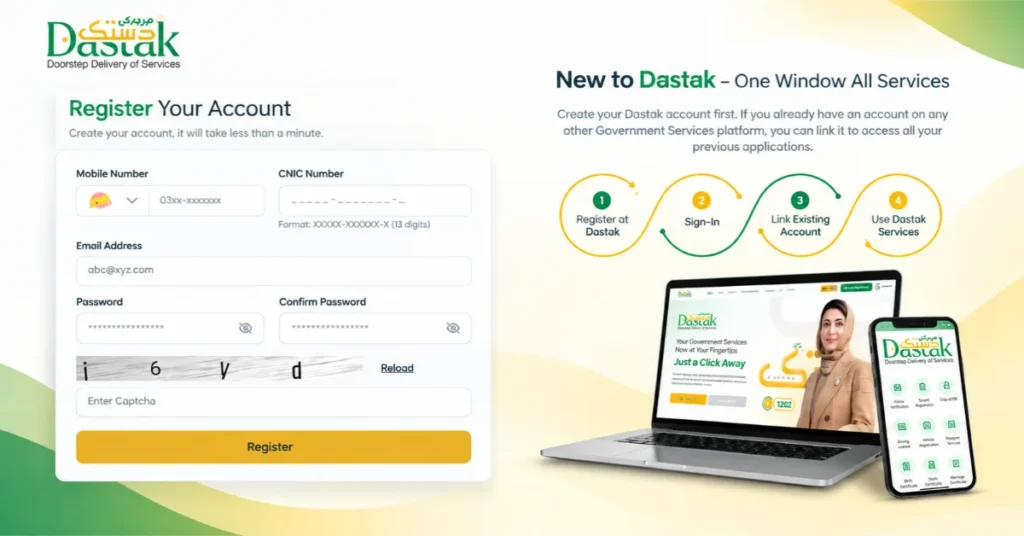
Below are the precise steps.
Step 1: Open the official registration page
- Open the Dastak Citizen Registration Page. It is critical to ensure that the URL is correct to avoid scams since the page does not belong to the dastak.punjab.gov.pk.
Step 2: Open the mobile number field
- Fill in the mobile number as indicated in the form below. It is essential to ensure that the number is correct since the verification code will be sent via SMS.
Step 3: Enter the CNIC number
- The next step is to fill in the CNIC number in the field provided below. Individuals are advised to double-check their information to prevent errors.
Step 4: Fill in the email address
- Individuals are required to provide a valid email address if the system requests for it. It is advisable to use an email account that can be accessed if the user needs assistance with their account.
Step 5: Set and retype the password
- Users should set up a strong password and type it again in the two empty fields provided below. Individuals should protect their passwords and avoid sharing them or any verification codes with another person.
Step 6: Enter the letters in the box
- To verify that the user is not a robot, the system will present a puzzle. The individual should type the letters displayed on the CAPTCHA image in the empty box below. If a person is unable to read the image, they should click on the reload link and try again.
Step 7: Submit the form
- The individual should then click Register and follow the instructions on the screen. After a successful sign up, users should log in to the portal to discover the services available.
Which Government Services Are Available on Dastak?
The official service directory lists options from several Punjab government departments. Here are some examples that citizens and businesses may find useful.
| Department | Examples of services listed |
| DLIMS | Learner driving licence, licence renewal and duplicate licence |
| Local Government | Birth, marriage, death and divorce certificates |
| Punjab Police | Traffic challan, tenant registration, copy of FIR, loss report and character certificate |
| Lahore Development Authority | Selected property and record-related services |
| Excise and Taxation | Vehicle registration, motor vehicle transfer, token tax and property tax |
| Board of Revenue | Domicile certificate, duplicate or modified domicile and e-stamping |
| Social Welfare | Appointment for a disability certificate |
| Punjab Food Authority | Food business licence and selected product approvals |
| Water and Sewerage | Domestic and commercial water connections |
| Higher Education | College admission applications |
How to Apply for a Service Through Dastak
- After registration, you can search for the necessary service and get acquainted with its requirements and apply for it.
- First, you need to go to the dastak website and log in to your account.
- Then you need to familiarize yourself with the available services, looking for the one you are interested in.
- You can search for a service by name or go to the relevant department.
- Once you have found the service you want, study its requirements and instructions.
- Fill out all the necessary information and attach the necessary documents if any.
- Further, choose how to apply in a particular service: usually, there is a choice of applying in different ways.
- After you have selected the application method, remember the reference number, which will be provided to you for convenient tracking of the application status.
Also Read: CM IT Internship Program 2026 – Registration, Eligibility, Stipend & Latest Update
What is Dastak Doorstep Service?
Doorstep service is designed for individuals who need assistance with an eligible government-service request but do not want to manage every detail themselves. As per the official Dastak service page, a facilitator can manage the process and deliver the documents to the applicant’s home for the services where this option is available. The doorstep delivery is currently available via the Dastak Citizen App.
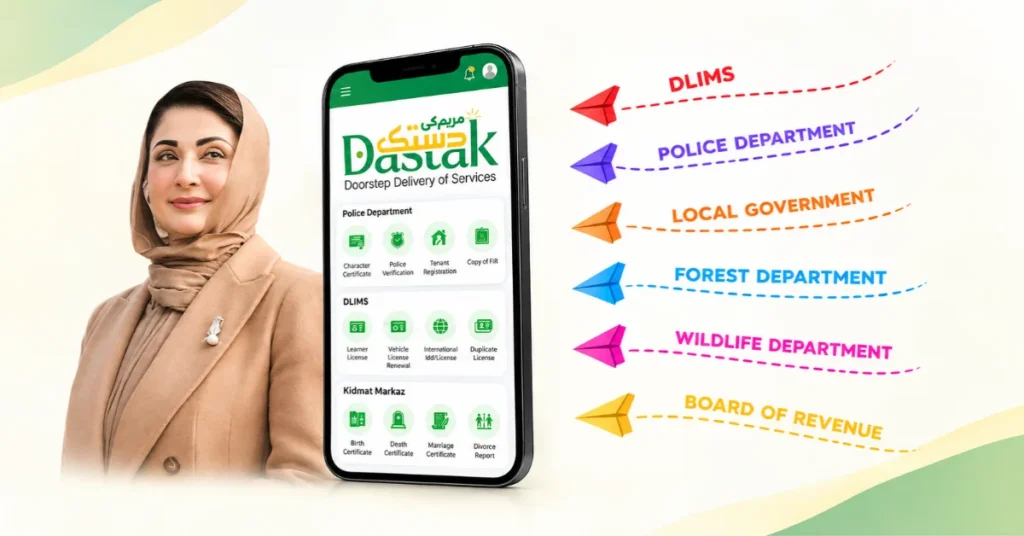
This option could be helpful for those who have a difficult time going to government offices or prefer assistance with the process.
How to Request Doorstep Delivery?
- Go to the official Dastak website and open its app-download section.
- Download the Dastak Citizen App using the official store link.
- Sign in or complete the account set up.
- Find the government service you require.
- Check whether the service offers doorstep delivery.
- Review the required documents and applicable charges.
- Follow the instructions to submit your request and arrange the facilitator’s visit.
Self-Service vs Doorstep Service
Dastak offers different ways to handle eligible service requests. Understanding the difference can help you choose the right option.
| Feature | Self-service | Doorstep service |
| Application | Apply online | Follow the app’s doorstep request process |
| Assistance | Handle the process yourself | A facilitator assists with the process |
| Document collection | Collect final documents from the relevant office when required | Documents may be collected or delivered at home |
| Availability | Depends on the selected service | Available for eligible services through the Citizen App |
How to Track My Dastak Application?
If you have applied for the service, it is important to keep the reference details of the application for the purpose of tracking your application or getting in touch with the support team.
To view your application:
- Go to the official website of Dastak .
- Log in to your citizen account.
- Open the relevant service/application section.
- Open your applied application.
- On the screen, you will see the status of your application along with the instructions if any.
In addition, the portal offers various DLIMS-related functions, including licence application tracking. In case you have applied through DLIMS before, upon logging into your account, the website will show that you can connect to your previous account to view eligible previous records.
Also Read: CM Punjab Green Credit Program 2026 – Registration, Cycling Reward & Green Credits
How to Download the Dastak Citizen App
The official site has the links to the Dastak Citizen App for Android and iPhone.
Make sure you go to Dastak Punjab and select the download option for either Android or iPhone. You should use the link to Google Play Store or Apple App Store on their site instead of downloading an installation file from an unknown source.
Remember that you should select the Citizen App on the site if you want to request any of the government services for yourself. They also have a Facilitator App for another purpose.
Is Maryam Ki Dastak Free?
Do not expect everything to be free only because you can register for it online. Depending on the government service you choose, the payment can be a combination of the official government fee and an extra doorstep charge.
- Before submitting your request for a service.
- you should read over the fee for that specific service.
- See if the doorstep charge has an extra cost.
And make sure you go over the payment instructions that the official site gives. It is also essential that you keep the receipt or proof of payment.
Maryam Ki Dastak Helpline and Contact Details
If you experience problems while registering, selecting a service or tracking an application, use the contact details published on the official website.
- Helpline: 1202
- Email: support@dastak.punjab.gov.pk
- Official website: https://dastak.punjab.gov.pk/
Important Tips Before Applying
Few things can make a difference and save you from the typical issues during the application process.
- Double-check that you are on the Punjab government website.
- Make sure to enter your CNIC and mobile number correctly.
- Read the service requirements before applying.
- Bring the required documents as stated in the application form in the format required by the department.
- Verify the processing fee before making the payment.
- Save your application reference and payment receipt.
- Download Dastak through the app-store links provided on the websites.
- Contact the support team if you have received any unclear instructions or cannot find the application.
Conclusion
Maryam Ki Dastak offers multiple Punjab government services under an umbrella portal where citizens can find the relevant procedures and guidelines for application or document submission for eligible services. They can create an account, review the requirements, track the application and request doorstep delivery.
The most important step is to ensure the selection of the accurate service according to the required documents. For the current list of services, app download, payment options and more, it is advisable to visit the official Dastak website rather than relying on unsubstantiated sources.